
You don’t have to be a professional project manager or a technical writer to write useful documentation. No system is permanent or maintenance-free and neither are the people who build them. When configuring a data entry form, designing data tables, Excel spreadsheets, or any other functional information tracking system, keep notes on what you do. Develop good habits by tracking the dates and the people involved.
I’ve been criticized for over-documenting. Sometimes I even doubt myself. Is writing documentation low-impact busywork that no one will ever notice? Well, maybe sometimes, but I’ve learned that in most situations, I don’t know if documentation will be needed until later. And by the time I need it, it’s too late; I have no idea what the heck I did or what was motivating me to do it.
For the Good of the Organization and Your Reputation
What happens if you get hit by a speeding Smart Car or mauled by a bear one day on the way to work? Will someone be able to pick up regular maintenance on the systems you were administering or the projects you were working on before the terrible accident occurred? How will anyone know why you configured things the way you did? What kind of idiot will they think you are if you don’t leave good notes on your process and the requirements for which you built those processes? Not only is this the right thing to do for business continuation purposes, but your reputation is on the line. “I’m glad Lea got eaten by that bear; I don’t understand this and so I must assume that she had no idea what the heck she was doing with these complicated spreadsheet formulas. We’re going to have to throw this whole thing out and start over.” Cha-ching! (That’s the sound of a consultant-to-clean-up-this-mess.)
For the Chronically Busy
Even though I haven’t been mauled by a Smart Car or run over by a bear yet, how will I know what I did or why I did it? Chronically busy people make sound decisions every day. But how the heck do you remember those decisions or the thought process you went through to get there next year? (Or in my case, next week?) Only so much fits into my hamster size brain (it really is abnormally small – I can wear child-sized hats) before I start hemorrhaging important bits of information that I swore I’d never forget. So I document things like:
- Here’s the reason I did this (the need it was intended to fill).
- Here’s when this was done.
- Here is a list of tools used to do it.
- Here are the tools and information bits people will need to KEEP doing it (if relevant).
- Here’s a list of all the people who chimed in on that decision and provided input (aka: other people who can share the credit or the blame).
- Here’s who to call if something goes wrong and I have been mauled by a smart bear car.
Think of this as the old Home Economics motto “clean as you go”, but for information system projects instead of cooking and writing instead of cleaning. (Yes, I am a master of metaphor.)
Avoid MS Word
Now that I’ve convinced you to bother documenting your work, I’d like to point out that a series of Microsoft Word files is definitely not the best way to do this.
My first complaint with MS Word files is that they’re not web-based. Information system documentation in an MS Word doc is like burying your notes in a coffee can in the backyard. If you must, use a google doc so that the whole versioning problem disappears (who’s editing the document now? what’s the latest version? did I remember to copy the latest version back to the server?) Additionally, MS Word files can be tough to find on a huge file server full of other office-wide files. They’re also relatively easy for people to accidentally (or on purpose) modify, overwrite or delete.
But my BIGGEST complaint with MS Word documentation is that they’re difficult to read and navigate. A 20 page specs document quickly becomes a bottomless pit of despair when it comes to detailed projects like database conversion field mapping or intake process workflows. In order to make 20 pages of specs even remotely coherent, you have to spend a lot of time formatting it with outlines and bullet points and bold font and columns and underlining and….ug. MS Word – probably great for drafting your first novel; of limited utility for information systems or workflow documentation.
There are many web-based software tools out there you can use to document projects large or small. Lately I’ve been using a free Trello account for tasks list and have found it really useful, collaborative and flexible. Trello allows me to create a “board” (aka the project) and then add lists to that board. I use lists to record focused tasks which need to be done, then mark them done by moving them to a “completed items” list. List items can have their own checklists and activity notes with audit trail, allowing you to see what your collaborators have done.
For workflow processes, I love OmniGraffle. You can create a graphical workflow digram just by typing steps in an outline, which keeps the learning curve low.
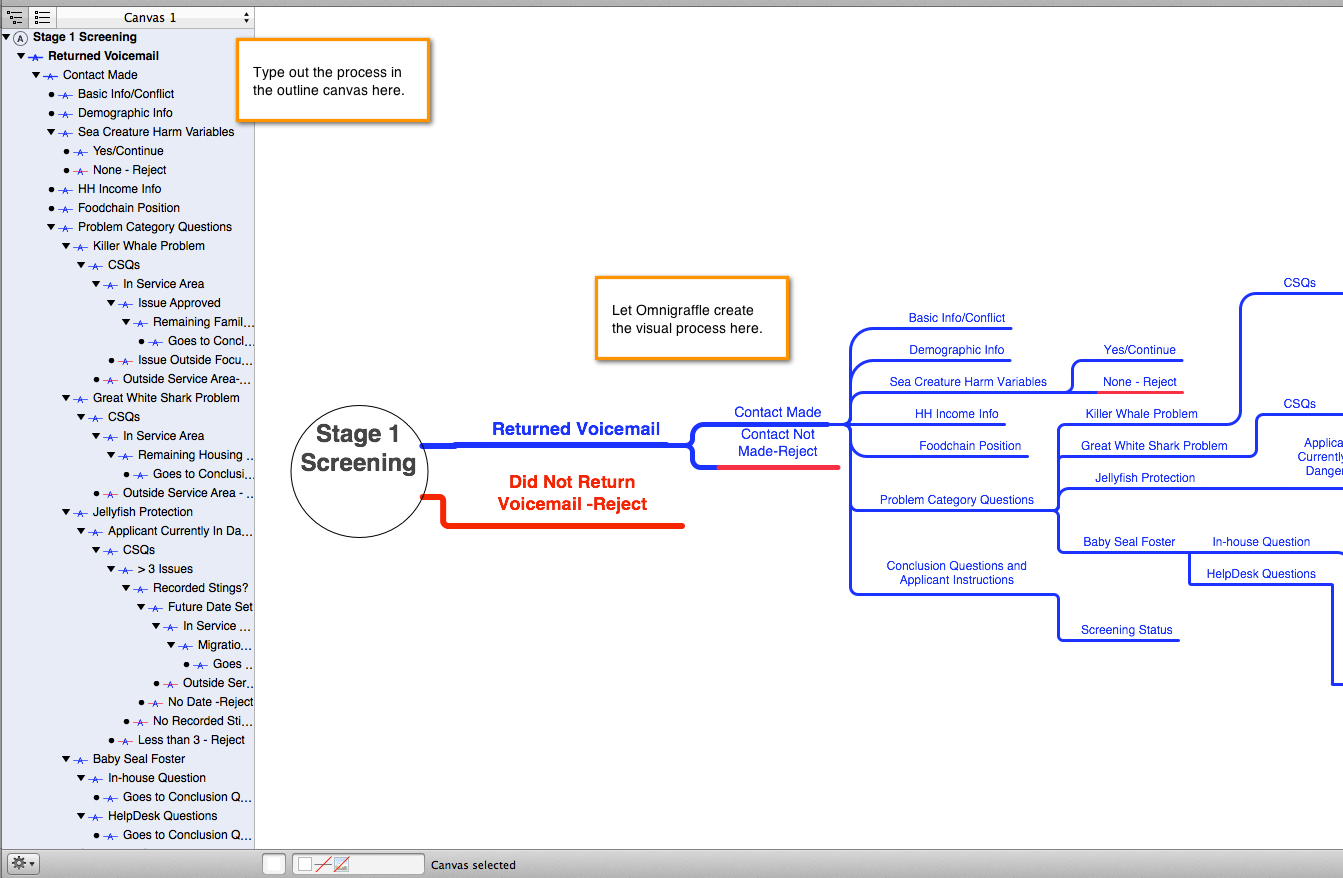
(a nonsensical example of workflow chart)
The downside to Omnigraffle is that it only runs on a Mac OS, which is lousy for collaboration with PC users. But you can export the finished products to PDF for presentation purposes.
For collaborative web-based flow-charts, I’ve heard nice things about Lucidchart, but have not had the chance to use it myself yet.
There’s also the robust beast of a flowcharting program, Microsoft Visio. Learning to use Visio may take a little more elbow grease and a little more cash than the average nonprofit staff has available.
For larger project implementations with a lot of milestone deliverables, I have used Basecamp, Wrike and Asana. Wrike and Asana are very similar. Both are built on a collaborative web-based platform. Wrike offered Gantt charts, which is helpful for complex or overlapping projects that depend on the same group of people. Basecamp, however, is very easy to use and learn and is probably the best solution for nonprofit organization staff who are not full time project managers.
I personally have not managed any projects which I thought were large enough to justify use of MS Project, but if you love Microsoft tools and your project requires advanced budgeting incorporation, MS Project might be for you. Just make sure that other people have access to the project files and know enough about how to navigate it to read your notes.
Some applications contain built-in spaces for configuration notes. If you contract with a consultant to write code or use software-specific configuration tools, have the consultant explain to you where they are going to write the documentation. If it is inside the code or application itself, ask yourself if something more accessible is needed for the lay persons who may need to reference it later. Do not believe that the specification documentation you wrote to commission the consultant will be enough. The “specs” document (or the Request for Proposal – RFP) is to describe your expectations and needs. These can turn out very different from the actual commissioned configuration or code.
Be consistent about how you document. For example, do not leave some notes in an Excel document and some in Basecamp without at least referencing one from the other. Or, if the project specs begin in a giant unwieldy MS Word document, pick it apart and put it into a platform like Trello or Basecamp and then continue your configuration documentation in that system, abandoning the Word doc after initializing the project.
The take-away on this is to consistently use something structured and accessible to the target audiences. Find and work with system administrators and programmers who keep good notes. (Programmers are notorious for lack of documentation because they just want to get the code written.) Be cautious of staff or consultants who repeatedly fail to document their work. They could be innocently forgetting to do it, but it could also be an indicator that they have something to hide or that they want to seal their position with a lack of transparency. (If they don’t understand what I’m doing, they might be afraid to fire me.) If you are hiring a consultant or new staff member, make your expectations clear before signing them on. I once had to pay a contractual programmer for 8 hours of work to document his own code…with the help of another consultant who was a documentation specialist. Just thinking about that still makes me gnash my teeth.


 Lea Remigio
Leave a comment